This is the full developer documentation for Plainterms Webhooks
# Plainterms
> Webhook documentation built for two readers: people who need the integration shape, and coding agents that need the exact contract.
# Agent Reference
> Agent-oriented Plainterms webhook contracts, retry behavior, and payload examples.
## Webhook Integration Guide
[Section titled “Webhook Integration Guide”](#webhook-integration-guide)
Plainterms can send webhook events to your system when quote lifecycle events happen or visitors open and click quote landing pages. Webhooks are configured in the Plainterms app under **Settings -> Webhooks**.
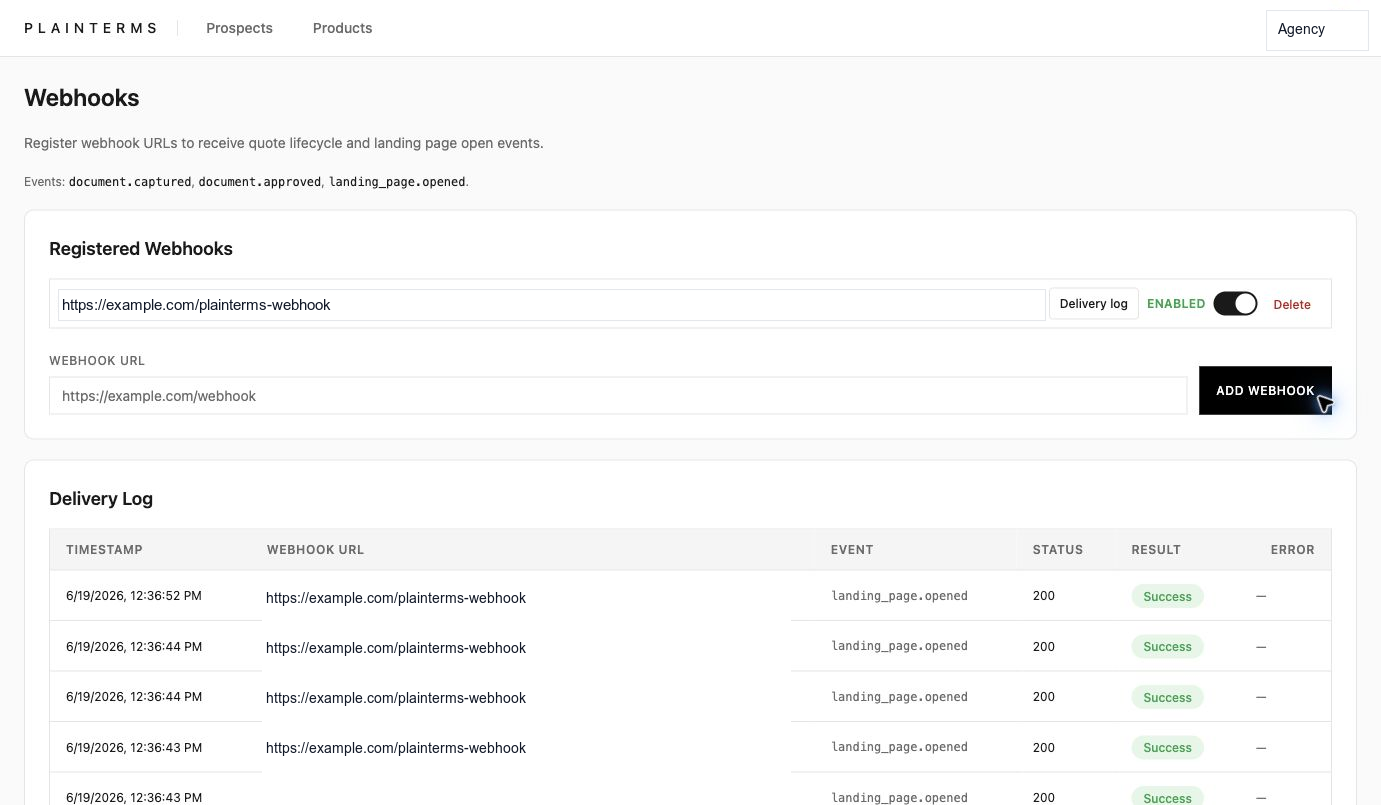
## Configure A Webhook
[Section titled “Configure A Webhook”](#configure-a-webhook)
1. Sign in to Plainterms as an administrator.
2. Open **Settings -> Webhooks**.
3. Enter your public webhook endpoint URL.
4. Select **Add Webhook**.
5. Copy the signing secret when Plainterms shows it. The secret is only shown once, so store it in your receiver as an environment variable.
6. Leave the webhook enabled, or use the toggle to disable delivery without deleting the endpoint.
Use HTTPS for production endpoints. Your receiver should accept `POST` requests with a JSON body and respond with a `2xx` status quickly.
## Events
[Section titled “Events”](#events)
Plainterms currently sends these event names:
* `document.captured`
* `document.approved`
* `landing_page.opened`
* `landing_page.clicked`
All payloads include an `event` name and ISO 8601 `timestamp`.
Quote document events include `document_id`, `organization_id`, extracted quote data when available, a best-effort normalized `value`, and, when Plainterms can grant one, a temporary branded PDF `download_url` with `download_url_expires_at`. The default download URL lifetime is seven days, unless the Plainterms runtime is configured differently. Treat `download_url` as a reusable bearer link until it expires; do not put it in logs, tickets, or chat transcripts.
Landing-page open events include `organization_id`, `magic_link_id`, `target_type`, `document_id`, `bundle_id`, `landing_page_url`, and `user_agent`. For bundle links, `document_id` can be `null`; for document links, `bundle_id` can be `null`; and `landing_page_url` or `user_agent` can be `null` when unavailable.
`landing_page.clicked` is the landing-page interest signal. Plainterms sends it when a visitor clicks the landing-page action that indicates they are interested in the quote or selected add-on, not when a policy is bound or paid. The payload includes the landing-page identifiers, document quote data when available, `add_on_product_selected`, `selected_add_on_product`, and, when Plainterms can grant one, the same temporary branded PDF `download_url` fields used by document events.
Example `landing_page.opened` payload:
```json
{
"event": "landing_page.opened",
"timestamp": "2026-06-19T19:05:00.000Z",
"organization_id": "00000000-0000-4000-8000-000000000002",
"magic_link_id": "00000000-0000-4000-8000-000000000003",
"target_type": "document",
"document_id": "00000000-0000-4000-8000-000000000001",
"bundle_id": null,
"landing_page_url": "https://app.plainterms.io/public/landing/example",
"user_agent": "Mozilla/5.0 ..."
}
```
Example `landing_page.clicked` payload:
```json
{
"event": "landing_page.clicked",
"timestamp": "2026-06-19T19:06:00.000Z",
"organization_id": "00000000-0000-4000-8000-000000000002",
"document_id": "00000000-0000-4000-8000-000000000001",
"extracted_data": {
"carrier": { "name": "Example Carrier" }
},
"value": null,
"magic_link_id": "00000000-0000-4000-8000-000000000003",
"target_type": "document",
"bundle_id": null,
"landing_page_url": "https://app.plainterms.io/public/landing/example",
"user_agent": "Mozilla/5.0 ...",
"add_on_product_selected": true,
"selected_add_on_product": {
"id": "00000000-0000-4000-8000-000000000004",
"title": "Vehicle Service Coverage",
"description": "Mechanical repair protection",
"callouts": ["Factory warranty gap"],
"price_schedule": [{ "label": "Monthly protection", "amount": "$49" }],
"period_note": "per month",
"featured": true
},
"download_url": "https://app.plainterms.io/api/external/branded-pdf/example-token",
"download_url_expires_at": "2026-06-26T19:06:00.000Z"
}
```
For complete TypeScript contracts and a document-event example, see [`llms.txt`](llms.txt).
## Verify Signatures
[Section titled “Verify Signatures”](#verify-signatures)
Each delivery includes:
* `Webhook-Signature`: `sha256=`
* `Webhook-Timestamp`: Unix timestamp in seconds
* `Webhook-Id`: stable delivery event ID for deduplication
* `Content-Type`: `application/json`
Compute an HMAC SHA-256 digest over the exact raw request body bytes using the signing secret shown when the webhook was created. Compare it to the hex value after `sha256=`. Do not verify against parsed and reserialized JSON.
Current Plainterms signatures cover the raw request body only. The `Webhook-Timestamp` header is delivery metadata; it is not included in the HMAC input. You can use it as a freshness sanity check, but not as cryptographic replay protection. Use `Webhook-Id` idempotency to prevent duplicate side effects.
```js
import { createHmac, timingSafeEqual } from 'node:crypto';
function headerValue(headers, name) {
const value = headers[name] ?? headers[name.toLowerCase()];
return Array.isArray(value) ? value[0] : value;
}
export function verifyPlaintermsWebhook(rawBody, headers, secret) {
const signature = headerValue(headers, 'webhook-signature') ?? '';
const prefix = 'sha256=';
if (!signature.startsWith(prefix)) return false;
const received = Buffer.from(signature.slice(prefix.length), 'hex');
const expected = Buffer.from(
createHmac('sha256', secret).update(rawBody).digest('hex'),
'hex',
);
return received.length === expected.length && timingSafeEqual(received, expected);
}
export function isFreshPlaintermsWebhook(headers, toleranceSeconds = 300) {
const timestamp = Number(headerValue(headers, 'webhook-timestamp'));
if (!Number.isFinite(timestamp)) return false;
const now = Math.floor(Date.now() / 1000);
return Math.abs(now - timestamp) <= toleranceSeconds;
}
```
Verify the body signature before trusting the JSON payload. Use `Webhook-Id` as an idempotency key so retries do not create duplicate downstream records. If a duplicate `Webhook-Id` arrives, avoid repeating side effects, but update your receipt metadata from the latest attempt; document deliveries can receive a fresh temporary `download_url` on a retry.
| Wire value | Meaning |
| ------------------- | ----------------------------------------------------------- |
| `Webhook-Id` header | Stable event delivery ID. Matches delivery-log `event_id`. |
| `event_id` | Delivery-log copy of the `Webhook-Id` value. |
| `webhook_id` | Plainterms endpoint configuration UUID. Not the dedupe key. |
| `event` | Event name inside the request payload. |
| `event_type` | Delivery-log copy of the event name. |
## Troubleshooting
[Section titled “Troubleshooting”](#troubleshooting)
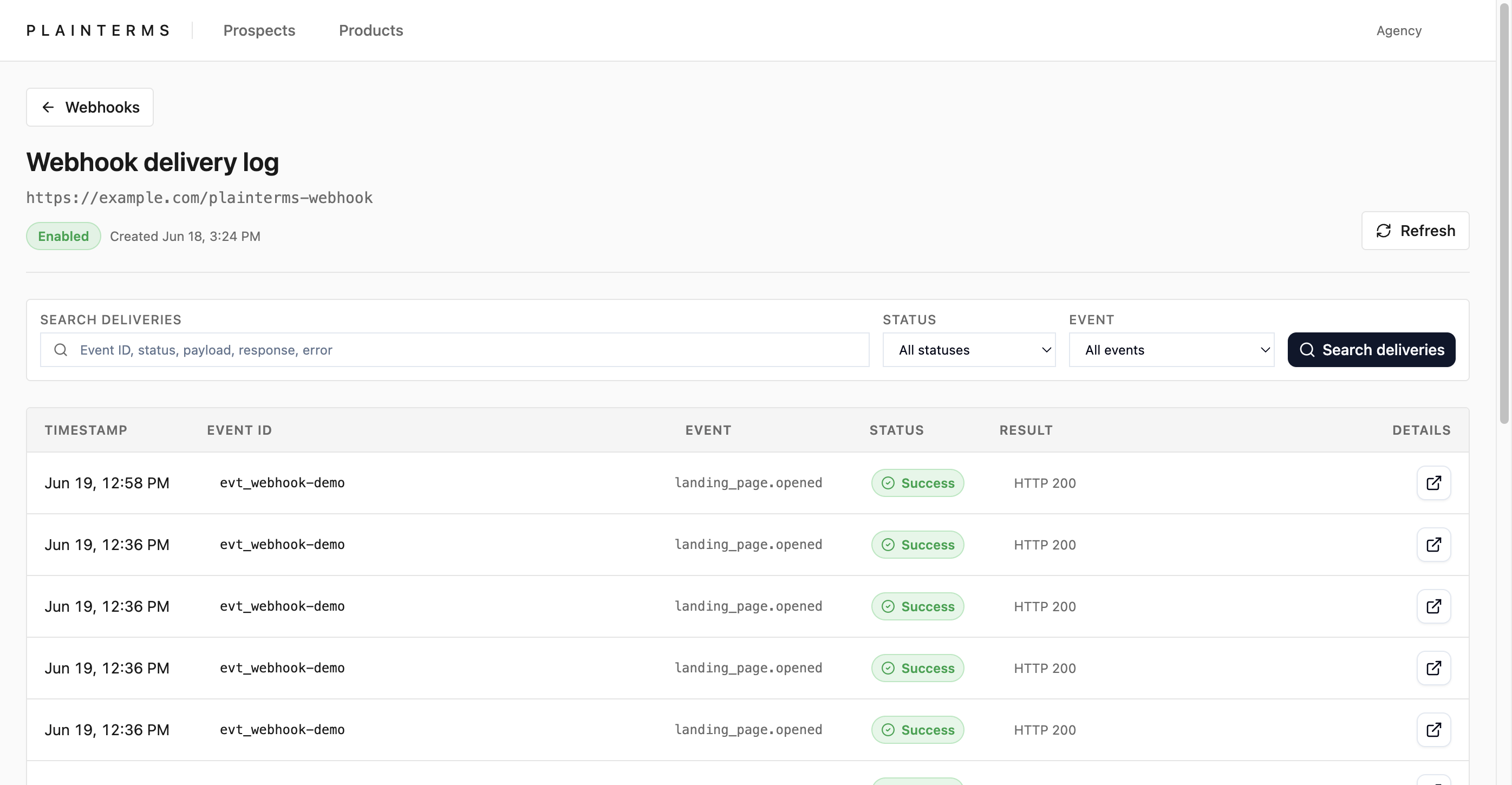
Open **Settings -> Webhooks** to see recent deliveries across endpoints. Select **Delivery log** on a registered webhook for searchable per-endpoint history. The log can be searched by event ID, status, request payload, response, or error; filtered by status and event; and each row can be opened to view the request and response captured for that delivery. Stored delivery-log copies redact branded PDF bearer tokens, and long response bodies can be truncated.
Common checks:
* No deliveries: confirm the webhook is enabled and the event you expect has actually happened.
* Failed status: open the delivery details and inspect the HTTP status, error, request body, and response body.
* Signature mismatch: verify against the raw request body, not parsed and reserialized JSON.
* Duplicate processing: deduplicate with `Webhook-Id`.
* Timeout or network errors: make the receiver public, keep response handling fast, and return a `2xx` only after the event is accepted.
## Agent Reference
[Section titled “Agent Reference”](#agent-reference)
The following agent-oriented reference is derived from the repository source `llms.txt`.
This file is for agents helping a user configure or debug Plainterms webhooks.
Plainterms webhook configuration is done in the app UI at Settings -> Webhooks or `/settings/webhooks`. The user must be an administrator to add, delete, or toggle webhooks.
Configuration steps:
1. Open Settings -> Webhooks.
2. Add a public receiver URL.
3. Copy the signing secret immediately when Plainterms shows it. It is shown once after creation. Do not put this secret in docs, tickets, screenshots, or chat transcripts.
4. Keep the endpoint enabled, or disable it with the toggle when deliveries should pause.
5. Use the Delivery log link beside a webhook for endpoint-specific delivery history.
Receiver requirements:
* Accept POST requests with JSON bodies.
* Use HTTPS in production.
* Return a 2xx status for accepted events. Non-2xx responses are failures.
* Respond quickly; slow receivers can be marked as timed out.
* Deduplicate by `Webhook-Id`, which maps to the delivery log’s `event_id`. Do not confuse it with `webhook_id`, which is the Plainterms endpoint UUID.
* When a duplicate `Webhook-Id` arrives, avoid repeating side effects but update receipt metadata from the latest attempt. Document delivery retries can carry a fresh temporary `download_url` and `download_url_expires_at`.
Supported event names:
* `document.captured`
* `document.approved`
* `landing_page.opened`
* `landing_page.clicked`
TypeScript delivery contracts:
```ts
export type UUID = string;
export type ISO8601Timestamp = string;
export type UrlString = string;
export type PlaintermsWebhookEventName =
| 'document.captured'
| 'document.approved'
| 'landing_page.opened'
| 'landing_page.clicked';
export interface PlaintermsWebhookHeaders {
/**
* Header names are case-insensitive. Many server frameworks expose them as
* lowercase keys.
*/
'content-type': string; // Usually application/json.
'webhook-signature': `sha256=${string}`;
/**
* Unix seconds. Current signatures do not include this header in the HMAC
* input, so treat it as metadata or a freshness sanity check, not as signed
* replay protection.
*/
'webhook-timestamp': `${number}`;
/**
* Stable delivery event id. This value matches Plainterms delivery-log
* `event_id`, not delivery-log `webhook_id`.
*/
'webhook-id': `evt_${string}`;
}
export interface PlaintermsDocumentWebhookPayload {
event: 'document.captured' | 'document.approved';
timestamp: ISO8601Timestamp;
document_id: UUID;
organization_id: UUID;
extracted_data: Record | null;
/**
* Best-effort normalized personal-auto value for downstream integrations.
* The exact nested shape can evolve; treat it as integration data, not a
* stable database schema.
*/
value: Record | null;
/**
* Temporary branded PDF URL. Omitted if Plainterms cannot grant a download,
* for example when threshold acknowledgement is required before rendering. It
* is a reusable bearer link until expiry; do not log it, paste it into tickets,
* or forward it outside the receiving system's trust boundary.
*/
download_url?: UrlString;
/**
* ISO timestamp for download_url expiry. Default lifetime is seven days
* unless the Plainterms runtime is configured with a different
* WEBHOOK_DOWNLOAD_GRANT_TTL_DAYS value.
*/
download_url_expires_at?: ISO8601Timestamp;
}
export interface PlaintermsLandingPageOpenedPayload {
event: 'landing_page.opened';
timestamp: ISO8601Timestamp;
organization_id: UUID;
document_id: UUID | null;
magic_link_id: UUID;
target_type: 'document' | 'bundle';
bundle_id: UUID | null;
landing_page_url: UrlString | null;
user_agent: string | null;
}
export interface PlaintermsSelectedAddOnProduct {
id: UUID;
title: string;
description: string;
callouts: string[];
price_schedule: Array<{ label: string; amount: string }>;
period_note: string | null;
featured: boolean;
}
export interface PlaintermsLandingPageClickedPayload {
/**
* Sent when a visitor clicks the public landing-page action that indicates
* interest in the quote or selected add-on. This is an interest signal, not a
* bound-policy or payment event.
*/
event: 'landing_page.clicked';
timestamp: ISO8601Timestamp;
organization_id: UUID;
/**
* Present for document-backed landing pages. Null for bundle-backed links or
* when no document context is available.
*/
document_id: UUID | null;
extracted_data: Record | null;
/**
* Best-effort normalized personal-auto value for downstream integrations.
* The exact nested shape can evolve; treat it as integration data, not a
* stable database schema.
*/
value: Record | null;
magic_link_id: UUID;
target_type: 'document' | 'bundle';
bundle_id: UUID | null;
landing_page_url: UrlString | null;
user_agent: string | null;
add_on_product_selected: boolean;
selected_add_on_product: PlaintermsSelectedAddOnProduct | null;
/**
* Optional enrichment for document-backed click events. If Plainterms cannot
* create a branded PDF grant, the click event can still be delivered without
* these fields.
*/
download_url?: UrlString;
download_url_expires_at?: ISO8601Timestamp;
}
export type PlaintermsWebhookPayload =
| PlaintermsDocumentWebhookPayload
| PlaintermsLandingPageOpenedPayload
| PlaintermsLandingPageClickedPayload;
export interface PlaintermsDeliveryLogEntry {
/**
* Copy of the Webhook-Id request header. Use this for receiver idempotency.
* Legacy rows can be null.
*/
event_id: `evt_${string}` | null;
/**
* Plainterms endpoint configuration UUID. This is not the same as Webhook-Id.
*/
webhook_id: UUID;
organization_id: UUID;
event_type: PlaintermsWebhookEventName;
status_code: number | null;
success: boolean;
attempt: number;
payload: PlaintermsWebhookPayload;
response_body: string | null;
error_message: string | null;
delivered_at: ISO8601Timestamp;
}
export interface PlaintermsReceiverAcceptedJson {
ok: true;
/**
* Optional. Plainterms does not require a receipt_id, but returning one makes
* support and cross-system tracing easier.
*/
receipt_id?: string;
/**
* Optional. Echo the Webhook-Id value if your platform supports it.
*/
event_id?: `evt_${string}`;
}
```
Security headers:
* `Webhook-Signature`: `sha256=`
* `Webhook-Timestamp`: Unix timestamp in seconds; metadata, not part of the HMAC
* `Webhook-Id`: stable delivery event ID; same value as delivery-log `event_id`
* `Content-Type`: `application/json`
Field-name mapping:
| Value | Meaning |
| --------------------------------------- | ------------------------------------------------ |
| `Webhook-Id` header | Stable delivery event id, prefixed with `evt_`. |
| `PlaintermsDeliveryLogEntry.event_id` | Stored copy of the `Webhook-Id` header. |
| `PlaintermsDeliveryLogEntry.webhook_id` | Endpoint configuration UUID. Not the dedupe key. |
| Payload `event` | Event name inside the JSON body. |
| Delivery log `event_type` | Stored copy of the payload event name. |
| Header `Webhook-Timestamp` | Unix seconds when the request was constructed. |
| Payload `timestamp` | ISO 8601 event timestamp in the JSON body. |
Signature verification:
Compute HMAC SHA-256 over the exact raw request body using the webhook signing secret. Compare the hex digest to the value after `sha256=` in `Webhook-Signature` using a constant-time comparison. Do not verify against parsed and reserialized JSON.
Current Plainterms signatures cover only the raw request body. The `Webhook-Timestamp` header is not included in the HMAC input. A receiver can reject obviously stale timestamps as a defense-in-depth sanity check, but this is not cryptographic replay protection because an attacker who has a valid body and signature can change an unsigned timestamp. Always combine signature verification with `Webhook-Id` idempotency.
Expected receiver behavior:
```ts
export type PlaintermsReceiverSuccessStatus =
| 200
| 201
| 202
| 204;
export interface PlaintermsReceiverResponseExpectation {
status: PlaintermsReceiverSuccessStatus | number;
body?: PlaintermsReceiverAcceptedJson | string | null;
}
```
Plainterms treats any HTTP 2xx response as accepted. A response body is not required. If a body is returned, Plainterms stores response text for delivery-log debugging. Return JSON such as `{ "ok": true, "receipt_id": "..." }` when the receiving system can create a durable receipt.
Plainterms treats non-2xx responses, network errors, and timeouts as failed attempts. Do not return a 2xx until the event is durably accepted or queued by the receiving system.
Delivery retry behavior:
```ts
export interface PlaintermsWebhookRetryPolicy {
/**
* Workflow start is best-effort. If Plainterms cannot start the delivery
* workflow, the source action is logged but document capture, approval, or
* landing-page open is not failed for the end user.
*/
workflowStartBehavior: 'best-effort';
/**
* The delivery step is configured as deliverOneWebhook.maxRetries = 5 in the
* current Workflow SDK implementation.
*/
deliveryStepMaxRetries: 5;
deliveryFetchTimeoutMs: 10_000;
landingPageOpenedUsesSameDeliveryWorkflow: true;
landingPageClickedUsesSameDeliveryWorkflow: true;
eventIdStability: 'same Webhook-Id across retries of the same logical delivery';
endpointIsolation: 'each enabled endpoint retries independently';
}
```
Operational retry notes:
* A webhook delivery workflow is started after Plainterms document capture, document approval, landing-page open, and landing-page click events. Failure to start webhook delivery is logged and does not fail the source user-facing action.
* Enabled endpoints are delivered in parallel.
* Each endpoint delivery step is configured with `maxRetries = 5`. Treat exact retry scheduling as runtime-controlled; do not depend on a precise backoff interval unless Plainterms documents one separately.
* The outbound HTTP request is aborted after about 10 seconds. The delivery failure is recorded as `Request timed out`.
* The same `Webhook-Id` is reused across retries of the same logical delivery. Use it as the idempotency key, and update receipt metadata for later attempts rather than blindly dropping all duplicate IDs.
* Document event and document-backed `landing_page.clicked` payload bases are loaded once for the delivery workflow. During each delivery attempt, Plainterms may create a fresh temporary `download_url` and `download_url_expires_at`, so those fields can differ between attempts with the same `Webhook-Id`.
* For `landing_page.clicked`, branded PDF URL creation is optional enrichment. If the grant cannot be created, Plainterms can still deliver the click event without `download_url` and `download_url_expires_at`.
* Plainterms records each attempt in the delivery log with attempt number, HTTP status, success flag, response body, error text, request payload, and delivery timestamp.
* Delivery-log payload copies redact branded PDF bearer tokens from `download_url`. Stored response bodies also redact branded PDF bearer tokens and are truncated to about 2000 characters.
Example `document.approved` payload:
```json
{
"event": "document.approved",
"timestamp": "2026-06-19T19:00:00.000Z",
"document_id": "00000000-0000-4000-8000-000000000001",
"organization_id": "00000000-0000-4000-8000-000000000002",
"extracted_data": {
"carrier": { "name": "Example Carrier" }
},
"value": {
"status": "READY",
"issuerId": "example-carrier",
"issuerName": "Example Carrier",
"policies": [
{
"id": "00000000-0000-4000-8000-000000000001",
"issuer": "example-carrier",
"policyType": "PERSONAL_AUTO",
"premiumCents": 123456
}
]
},
"download_url": "https://app.plainterms.io/api/external/branded-pdf/example-token",
"download_url_expires_at": "2026-06-26T19:00:00.000Z"
}
```
Example `landing_page.opened` payload:
```json
{
"event": "landing_page.opened",
"timestamp": "2026-06-19T19:05:00.000Z",
"organization_id": "00000000-0000-4000-8000-000000000002",
"magic_link_id": "00000000-0000-4000-8000-000000000003",
"target_type": "document",
"document_id": "00000000-0000-4000-8000-000000000001",
"bundle_id": null,
"landing_page_url": "https://app.plainterms.io/public/landing/example",
"user_agent": "Mozilla/5.0 ..."
}
```
Example `landing_page.clicked` payload:
```json
{
"event": "landing_page.clicked",
"timestamp": "2026-06-19T19:06:00.000Z",
"organization_id": "00000000-0000-4000-8000-000000000002",
"document_id": "00000000-0000-4000-8000-000000000001",
"extracted_data": {
"carrier": { "name": "Example Carrier" }
},
"value": {
"status": "READY",
"issuerId": "example-carrier",
"issuerName": "Example Carrier",
"policies": [
{
"id": "00000000-0000-4000-8000-000000000001",
"issuer": "example-carrier",
"policyType": "PERSONAL_AUTO",
"premiumCents": 123456
}
]
},
"magic_link_id": "00000000-0000-4000-8000-000000000003",
"target_type": "document",
"bundle_id": null,
"landing_page_url": "https://app.plainterms.io/public/landing/example",
"user_agent": "Mozilla/5.0 ...",
"add_on_product_selected": true,
"selected_add_on_product": {
"id": "00000000-0000-4000-8000-000000000004",
"title": "Vehicle Service Coverage",
"description": "Mechanical repair protection",
"callouts": ["Factory warranty gap"],
"price_schedule": [{ "label": "Monthly protection", "amount": "$49" }],
"period_note": "per month",
"featured": true
},
"download_url": "https://app.plainterms.io/api/external/branded-pdf/example-token",
"download_url_expires_at": "2026-06-26T19:06:00.000Z"
}
```
Troubleshooting flow:
1. Confirm the webhook is enabled.
2. Check Settings -> Webhooks for recent delivery status.
3. Open the per-webhook Delivery log.
4. Filter by status or event if needed.
5. Open a delivery row to inspect event ID, attempt, HTTP status, request body, response body, and error text.
6. For no deliveries, confirm the triggering Plainterms event happened.
7. For failed deliveries, fix receiver URL reachability, response status, timeout behavior, or signature validation.
Screenshots in this repo are sanitized examples:
* `assets/screenshots/webhooks-overview.png`
* `assets/screenshots/webhook-delivery-log.png`
# Webhook Integration
> Configure Plainterms webhooks, verify signatures, handle events, and debug deliveries.
Plainterms sends webhook events when quote documents and public landing pages change state. This guide is written for people setting up the integration: where to configure the endpoint, what events to expect, how to verify the signature, and how to debug failed deliveries.
For coding agents, use [`/llms.txt`](/llms.txt) first. The agent index is shorter and more contract-oriented than this human guide.
## Integration Flow
[Section titled “Integration Flow”](#integration-flow)
1. Add a public receiver URL in Plainterms.
2. Copy the signing secret once and store it in your receiver environment.
3. Accept `POST` requests with JSON bodies.
4. Verify `Webhook-Signature` against the exact raw request body.
5. Deduplicate work with `Webhook-Id`.
6. Return a `2xx` only after the event is accepted or durably queued.
7. Use the Plainterms delivery log to inspect attempts, errors, and responses.

## Configure A Webhook
[Section titled “Configure A Webhook”](#configure-a-webhook)
Plainterms webhook configuration lives in the app under **Settings -> Webhooks**. The user adding the endpoint must be an administrator.
1. Open **Settings -> Webhooks**.
2. Enter your public webhook endpoint URL.
3. Select **Add Webhook**.
4. Copy the signing secret when Plainterms shows it.
5. Store the secret as an environment variable in your receiver.
6. Leave the webhook enabled, or use the toggle to pause deliveries without deleting the endpoint.
Use HTTPS for production endpoints. Keep the receiver fast: Plainterms treats slow receivers, network errors, and non-`2xx` responses as failed delivery attempts.
## Event Types
[Section titled “Event Types”](#event-types)
Plainterms currently sends four event names.
| Event | When it is sent | Human meaning |
| ---------------------- | ----------------------------------------- | ------------------------------------------------------------ |
| `document.captured` | A quote document is captured. | A new document is available for downstream systems. |
| `document.approved` | A quote document is approved. | The document passed the approval step. |
| `landing_page.opened` | A visitor opens a public landing page. | The quote or bundle page was viewed. |
| `landing_page.clicked` | A visitor clicks the landing-page action. | Interest was expressed; this is not a bind or payment event. |
All payloads include an `event` name and ISO 8601 `timestamp`.
### Document Events
[Section titled “Document Events”](#document-events)
Document events include `document_id`, `organization_id`, extracted quote data when available, and a best-effort normalized `value`.
When Plainterms can grant a branded PDF download, document events can also include:
* `download_url`
* `download_url_expires_at`
Treat `download_url` as a reusable bearer link until expiry. Do not put it in logs, tickets, screenshots, or chat transcripts.
### Landing Page Events
[Section titled “Landing Page Events”](#landing-page-events)
`landing_page.opened` includes the landing-page identifiers and request context:
* `organization_id`
* `magic_link_id`
* `target_type`
* `document_id`
* `bundle_id`
* `landing_page_url`
* `user_agent`
For bundle links, `document_id` can be `null`. For document links, `bundle_id` can be `null`. `landing_page_url` and `user_agent` can also be `null` when unavailable.
`landing_page.clicked` is an interest signal. It includes the same landing-page identifiers plus selected add-on information when applicable. For document-backed click events, Plainterms can include the same temporary branded PDF download fields used by document events.
## Verify Signatures
[Section titled “Verify Signatures”](#verify-signatures)
Every delivery includes these headers:
| Header | Purpose |
| ------------------- | ---------------------------------------------------------------- |
| `Webhook-Signature` | `sha256=` signature for the raw body. |
| `Webhook-Timestamp` | Unix timestamp in seconds. Metadata, not part of the HMAC input. |
| `Webhook-Id` | Stable delivery event ID for idempotency. |
| `Content-Type` | Usually `application/json`. |
Compute an HMAC SHA-256 digest over the exact raw request body bytes using the signing secret shown when the webhook was created. Compare it to the hex value after `sha256=`. Do not verify against parsed and reserialized JSON.
```js
import { createHmac, timingSafeEqual } from 'node:crypto';
function headerValue(headers, name) {
const value = headers[name] ?? headers[name.toLowerCase()];
return Array.isArray(value) ? value[0] : value;
}
export function verifyPlaintermsWebhook(rawBody, headers, secret) {
const signature = headerValue(headers, 'webhook-signature') ?? '';
const prefix = 'sha256=';
if (!signature.startsWith(prefix)) return false;
const received = Buffer.from(signature.slice(prefix.length), 'hex');
const expected = Buffer.from(
createHmac('sha256', secret).update(rawBody).digest('hex'),
'hex',
);
return received.length === expected.length && timingSafeEqual(received, expected);
}
```
Current Plainterms signatures cover the raw request body only. The timestamp is useful as a freshness sanity check, but it is not cryptographic replay protection. Use `Webhook-Id` as the idempotency key for side effects.
## Delivery Behavior
[Section titled “Delivery Behavior”](#delivery-behavior)
Plainterms starts webhook delivery after document capture, document approval, landing-page open, and landing-page click events. Delivery startup is best-effort and does not block the source user-facing action.
Enabled endpoints are delivered independently. Plainterms records attempts with the event ID, event type, HTTP status, success flag, response body, error text, request payload, and delivery timestamp.
Use this mapping when reconciling receiver logs with the Plainterms delivery log:
| Wire value | Meaning |
| ------------------- | ----------------------------------------------------------- |
| `Webhook-Id` header | Stable event delivery ID. Matches delivery-log `event_id`. |
| `event_id` | Delivery-log copy of the `Webhook-Id` value. |
| `webhook_id` | Plainterms endpoint configuration UUID. Not the dedupe key. |
| `event` | Event name inside the request payload. |
| `event_type` | Delivery-log copy of the event name. |
## Troubleshooting
[Section titled “Troubleshooting”](#troubleshooting)
Open **Settings -> Webhooks** to see recent deliveries across endpoints. Select **Delivery log** on a registered webhook for searchable per-endpoint history.

Use the delivery log to inspect:
* event ID
* event type
* attempt number
* HTTP status
* request payload
* response body
* error message
* delivery timestamp
Common checks:
| Symptom | What to check |
| ------------------------ | ------------------------------------------------------------------------------------- |
| No deliveries | Confirm the webhook is enabled and the triggering event happened. |
| Failed status | Open the delivery row and inspect HTTP status, error, request, and response. |
| Signature mismatch | Verify against the raw request body, not parsed JSON. |
| Duplicate processing | Deduplicate with `Webhook-Id`. |
| Timeout or network error | Make the receiver public, keep handling fast, and return `2xx` only after acceptance. |
## Agent Resources
[Section titled “Agent Resources”](#agent-resources)
Agents should start from [`/llms.txt`](/llms.txt). For more context, use [`/llms-full.txt`](/llms-full.txt). To inspect this page as raw markdown, use [`/docs.md`](/docs.md).